Who Viewed My Snapchat Profile? What Snapchat Actually Shows
By the View Snapchat Stories team · · 2 min read
What Snapchat does show
| Where | Names? | Numbers? |
|---|---|---|
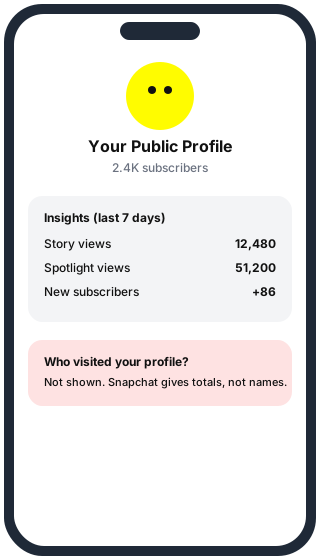
| Your profile page | No | No |
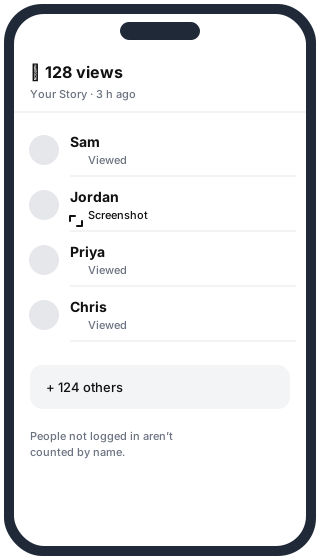
| Your Story (friends) | Yes, who watched each Snap | Yes |
| Your public Story | Friends and some other users | Yes, including “+ others” |
| Public profile Insights | No | Views, reach, subscribers, audience |
| Spotlight videos | No | View count per video |
| Snap Map | No | No; it shows where friends are, not who looked |
How to see who watched your Story
- Tap your profile picture (top left).
- Under My Stories, open your Story.
- Swipe up on a Snap, or tap the eye icon, to see the names.
More detail in How to see who viewed your Snapchat Story.
“See who viewed your profile” apps are fake
Snapchat has no data about profile visitors to give out, so any app or website promising a visitor list is guessing, or is after your login. Signs of a scam:
- It asks for your Snapchat username and password.
- It wants you to complete a survey or install another app to “unlock” results.
- It shows names that turn out to be your own friends list.
Giving your password to one of these can get your account taken over or locked by Snapchat.
Can people see that I looked at their profile?
No. Looking at someone’s profile doesn’t tell them. Watching their Story while logged in does put your name in their viewer list. Watching a public Story without logging in, for example with our Story Viewer, doesn’t, because there’s no account to show.
Questions
Do Snapchat+ subscribers see profile visitors? No. Snapchat+ adds extras such as seeing who rewatched your Story, but not who visited your profile.
Does adding someone show I visited their profile? Adding sends a friend request; it doesn’t say how you found them.